Choosing between Amiga WHDLoad .lha vs .adf is the single biggest quality-of-life decision when building a Commodore Amiga library. On Rebit's Commodore Amiga browser emulator, PUAE supports .lha, .adf, .adz, .dms, and .m3u multi-disk sets—so you can play classic floppy backups you own or load single-file WHDLoad archives with zero disk swapping.
Why WHDLoad .lha beats raw floppies for most games
Classic Amiga masterpieces like Monkey Island 2, Beneath a Steel Sky, and Sensible World of Soccer shipped across anywhere from two to eleven 3.5-inch floppy disks. Playing raw .adf floppy images faithfully recreates the waiting and the "Please insert Disk 4" prompts.
WHDLoad .lha archives package a game's installed hard-drive files into one compact archive that PUAE mounts and boots straight into the title screen—no floppy swapping, faster loading, and cleaner saving.
| Amiga format | Best for | Multi-disk handling |
|---|---|---|
.lha (WHDLoad) |
Fast single-file boot with zero disk swaps | Everything lives inside one archive |
.adf / .adz / .dms |
Single-disk classics or original floppy backups | Pair with an .m3u playlist for multi-disk games |
.m3u playlist |
Multi-disk .adf sets |
List each disk filename (one per line) and swap from the in-game menu |
Setting up a multi-disk .m3u for Amiga .adf backups
If your backup is a stack of .adf files rather than an .lha package, create a plain text file ending in .m3u containing the exact filenames of each disk in order:
GameName (Disk 1).adf
GameName (Disk 2).adf
GameName (Disk 3).adf
Upload the .m3u together with all of its .adf files in one upload. When the game asks for Disk 2, open Rebit's in-game menu and switch to the next disk slot without restarting.
Joystick, mouse, and keyboard on PUAE
Unlike consoles, Amiga games freely mix joystick action (Turrican II, Speedball 2) with mouse-driven point-and-click adventures and keyboard shortcuts. Rebit runs PUAE in both desktop browsers and mobile apps, with cloud saves keeping your save states synced between screens. Also collecting other classic European home computers? Check out our ZX Spectrum formats guide or MS-DOS browser player.
Practical tips for Amiga WHDLoad .lha vs .adf on Rebit
When you have a choice between a single .lha WHDLoad archive and a four-disk .adf set of the same game you own, start with .lha. Not only does it skip floppy loading waits, it also avoids mid-boss disk prompts and keeps your library tidy with one entry per title.
If you are running an original .adf, .adz, or .dms floppy backup instead:
- Keep disk filenames simple inside your
.m3uplaylist—no subfolder prefixes—so PUAE can match every disk in order. - Test mouse vs. joystick mode on the title screen. Strategy and adventure games expect mouse clicks, while action platformers and shooters expect Port 2 joystick input.
- Save states are your best friend on unforgiving 1980s European arcade ports, and Rebit syncs them across browser and phone via cloud saves.
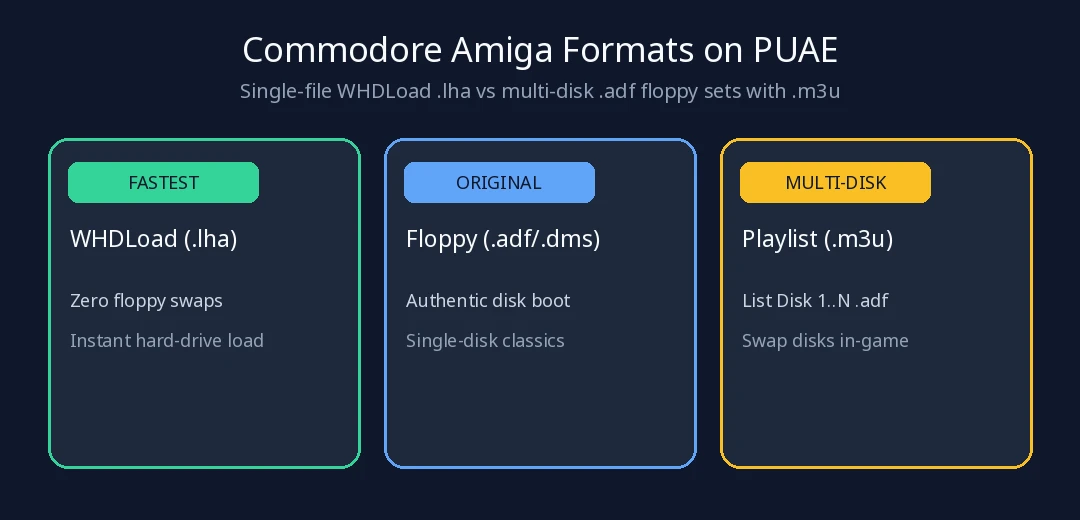 WHDLoad .lha packages boot straight into gameplay without floppy swaps, while .m3u playlists let you swap multi-disk .adf sets from Rebit's in-game menu.
Why the Commodore Amiga library still captivates retro fans
Between 1985 and 1994, the Commodore Amiga delivered arcade-grade 16-bit color, four-channel sampled Paula audio, and a wave of creative European studios—Bitmap Brothers, Psygnosis, Sensible Software, Team17, and Factor 5—whose games looked and sounded unlike anything on consoles at the time. Titles like Turrican II, Sensible World of Soccer, Speedball 2: Brutal Deluxe, Cannon Fodder, and The Secret of Monkey Island remain endlessly replayable today.
The only hurdle on modern devices has always been managing stacks of 880 KB floppy disks. On Rebit's Commodore Amiga browser emulator, PUAE gives you both paths: single-file WHDLoad .lha packages for instant zero-swap launching, and .adf/.adz/.dms + .m3u playlists for authentic floppy backups you own.
Five classic Amiga genres and how they play on PUAE
| Genre | Standout examples | Best input on Rebit |
|---|---|---|
| Action-platformers | Turrican II, Zool, Ruff 'n' Tumble | Bluetooth/USB gamepad or touch D-pad |
| Sports & arcade | Sensible World of Soccer, Speedball 2 | Gamepad (one-button Amiga joystick feel) |
| Point-and-click adventures | Monkey Island, Beneath a Steel Sky | Desktop mouse or touch pointer |
| Strategy & tactics | Cannon Fodder, Lemmings, Dune II | Desktop mouse + keyboard shortcuts |
| Shoot-'em-ups | SWIV, Project-X, Apidya | Gamepad for crisp diagonal dodging |
Troubleshooting Amiga uploads and disk swaps
- Game stops at a "Please insert Disk 2" screen: Make sure you uploaded an
.m3uplaylist alongside every.adfdisk file—not just Disk 1 by itself—and swap to Disk 2 inside Rebit's in-game menu. - Joystick does not move the menu cursor: Many Amiga games put menus on Mouse (Port 1) and gameplay on Joystick (Port 2), or require pressing Fire once on the cracktro/title screen to advance.
- Preserve progress with cloud saves: Multi-disk Amiga epics can be brutally hard; Rebit's cloud saves keep your save states synced across desktop browsers and phones. Also exploring other classic home computers? Check out our ZX Spectrum file formats guide or MS-DOS browser emulator.