Beetle WonderSwan
Play WonderSwan games online
From the WonderSwan Color remakes of Final Fantasy I, II, and IV to Gunpey, Klonoa: Moonlight Museum, Judgement Silversword, Riviera, Front Mission, Makaimura, Digimon titles, and English fan translations, Rebit runs your own .ws and .wsc cartridges at 60 fps in a browser or on your phone.
Upload your own .ws or .wsc cartridge backup — no BIOS required. Rebit supplies no games.

- Core & BIOS
- Beetle WonderSwan · no BIOS needed
- Files & Saves
- .ws and .wsc · auto EEPROM/SRAM cloud saves
- Orientation & Netplay
- Rotate (Select) · Stream rooms only
From .ws or .wsc cartridge to first battle
Start with a cartridge backup you own, a patched translation of your dump, or WonderSwan homebrew.
-
01
Upload your .ws or .wsc file
Add your monochrome WonderSwan (.ws) or WonderSwan Color (.wsc) dump to your Rebit library. No BIOS file is needed.
-
02
Play at 60 fps—or tap Rotate
Launch in your browser or phone app (from OTA v2.1.230). For vertical games, tap Rotate (Select) to flip the screen upright with matching controls.
-
03
Keep EEPROM/SRAM saves in the cloud
Cartridge saves upload automatically so your RPG progress follows you between browser and phone.
Vertical & horizontal
Rotate turns the screen—and follows with controls
Bandai’s WonderSwan was designed to be held either sideways or upright depending on the game. Tap Rotate (Select) on Rebit and the picture turns upright while your controls remap automatically: the D-pad drives the second Y-pad, A/B/X/Y drive the X-pad, and L/R act as A/B.
Standard modeD-pad, A, B, X, Y, L, R, and Start for horizontal games like Final Fantasy, Klonoa, and Digimon.
Rotated (TATE) modeTap Rotate (Select) for vertical games like Gunpey or Judgement Silversword—controls remap on the fly.
Cloud EEPROM/SRAMCartridge EEPROM and SRAM saves upload automatically so long RPGs stay synced across devices.
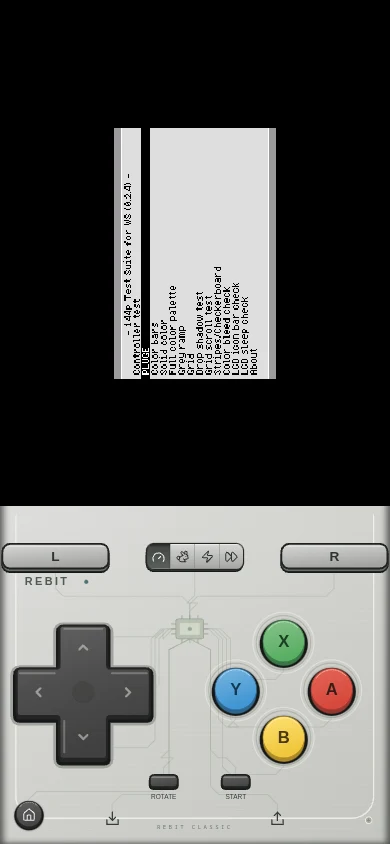
Horizontal or vertical. Controls follow the screen.
WonderSwan & WonderSwan Color questions
Does Rebit support both WonderSwan and WonderSwan Color?
Yes. Beetle WonderSwan runs both monochrome WonderSwan (.ws) and WonderSwan Color (.wsc) cartridges at 60 fps in browsers and phone apps.
Do I need a WonderSwan BIOS file?
No. Beetle WonderSwan boots your .ws and .wsc cartridges directly with no BIOS upload required.
How do vertical WonderSwan games work?
Tap Rotate (mapped to Select). Rebit rotates the display upright and automatically remaps the controls—D-pad drives the second Y-pad, A/B/X/Y drive the X-pad, and L/R act as A/B.
Do saves sync across devices, and is online multiplayer supported?
Yes to cloud saves: cartridge EEPROM and SRAM saves upload automatically to your Rebit account. Online multiplayer uses Stream rooms only, where the host runs the cartridge and a friend watches or sends inputs.
Related guides
Other systems
Play your WonderSwan library
Open Rebit and add a .ws or .wsc cartridge backup you own. Start free and upgrade only when your library grows.