Gearcoleco
Play ColecoVision games online
From Donkey Kong, Zaxxon, Venture, Lady Bug, and Mr. Do! to Burgertime, Pitfall II, Smurf: Rescue in Gargamel’s Castle, Antarctic Adventure, Cosmic Avenger, and modern CVBasic homebrew, Rebit runs your own .col and .cv cartridges at 60 fps in a browser or on your phone.
Upload your own .col or .cv cartridge backup — the ColecoVision BIOS is provided automatically. Rebit supplies no games.
- Core & BIOS
- Gearcoleco · ColecoVision BIOS built in
- Files & Speed
- .col / .cv cartridges · 60 fps web & phone
- Controls & Netplay
- Full 12-key keypad · Stream rooms only
From .col cartridge to skill select
Bring your own cartridge backup or a CVBasic homebrew release from its creator.
-
01
Upload your .col or .cv file
Add your ColecoVision cartridge dump to your Rebit library. Rebit provides the ColecoVision BIOS automatically—no separate BIOS upload required.
-
02
Pick your skill level on the keypad
Launch at 60 fps in your browser or phone app (from OTA v2.1.232). Tap 1–9, 0, *, or # on screen—or use the built-in gamepad keypad map.
-
03
Save states or host a Stream room
Keep cloud save states synced between devices, or invite a friend into a Stream room to trade arcade runs.
12-key keypad & controls
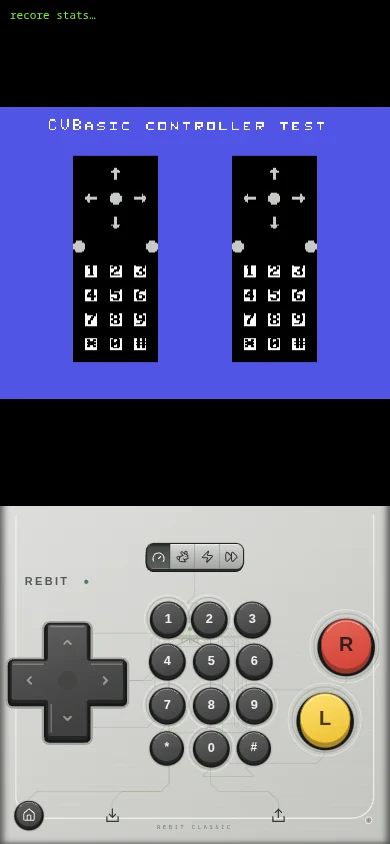
Joystick, L/R fire buttons, and the full 12-key keypad
Every ColecoVision cartridge asks you to pick a skill level or player count on the console’s 12-key keypad (1–9, 0, *, #). Rebit puts the entire keypad right on screen alongside the joystick and L/R fire buttons—and maps every single key onto a Bluetooth or USB gamepad so you never get stuck on a title screen.
On-screen keypadTap 1–9, 0, *, or # right beneath the display alongside the joystick and left/right fire buttons (L and R).
Gamepad keypad mapY=1, X=2, L=3, R=4, L2=5, R2=6, Right Stick L/R/U/D = 7/8/9/0, Start=*, Select=#.
Built-in BIOSRebit supplies the ColecoVision BIOS automatically—just upload your .col or .cv cartridge and play at 60 fps.
Arcade hits of 1982. Keypad included.
ColecoVision emulator questions
Do I need to upload a ColecoVision BIOS file?
No. Rebit supplies the ColecoVision BIOS automatically for Gearcoleco, so you only need to upload your own .col or .cv cartridge file.
How do I press keypad numbers (1–9, 0, *, #) on a gamepad?
On a Bluetooth or USB gamepad, Rebit maps Y=1, X=2, L=3, R=4, L2=5, R2=6, Right Stick Left/Right/Up/Down = 7/8/9/0, Start=*, and Select=#—and the full 12-key keypad is always available on touchscreens.
Can I play ColecoVision on my phone?
Yes. ColecoVision runs at 60 fps in mobile browsers and the Rebit phone apps (from OTA v2.1.232), with the full 12-key keypad, joystick, and L/R fire buttons on screen.
How does two-player online play work?
ColecoVision netplay uses Stream rooms only: the host runs the cartridge locally and the guest watches or sends controller inputs.
Related guides
Other systems
Play your ColecoVision library
Open Rebit and add a .col or .cv cartridge backup you own. Start free and upgrade only when your library grows.