Recore · Virtual Jaguar
Play Atari Jaguar games online
Run your own Atari Jaguar (.j64, .jag, .abs, .cof, .rom, and .bin) cartridge backups in a browser or on your phone—powered by Virtual Jaguar on Recore with boot built in, authentic C-B-A + Pause/Option controls, automatic EEPROM cloud saves, and stream rooms.
Upload .j64 or .jag (auto-detected), or pick Atari Jaguar for .abs/.cof/.rom/.bin — no BIOS needed. Rebit supplies no games.
- Core & Boot
- Virtual Jaguar (Recore) · Boot built in, no BIOS
- Files & Media
- .j64/.jag (auto) · .abs/.cof/.rom/.bin · Cartridge only (no Jaguar CD)
- Saves & Rooms
- Auto EEPROM cloud saves · 60 fps · Stream rooms only
From .j64 cartridge backup to play
Bring your own legally dumped Atari Jaguar cartridge file.
-
01
Upload .j64, .jag, or pick Atari Jaguar
.j64 and .jag files auto-detect automatically. For .abs, .cof, .rom, or .bin dumps, select Atari Jaguar in the upload picker.
-
02
Boot straight in—no BIOS files needed
Virtual Jaguar on Recore includes built-in boot support across desktop browsers and phone apps (from OTA v2.1.241).
-
03
Play with C-B-A, cloud EEPROM & stream rooms
Use on-screen C, B, A, Pause, and Option—or map gamepad X/L/R/L2/R2 to keypad 0–4—with automatic EEPROM cloud saves and stream rooms.
Recore + Virtual Jaguar
Built-in boot ROM, C-B-A + Pause/Option controls, gamepad keypad 0–4 & automatic EEPROM cloud saves
Rebit runs Atari Jaguar cartridges on Recore with Virtual Jaguar (virtualjaguar_recore_1) across desktop browsers and phone apps (from OTA v2.1.241). Boot firmware is built in—no BIOS upload needed—and cartridge EEPROM saves sync to the cloud automatically.
.j64 / .jag auto-detect + .abs/.cof/.rom/.binUpload .j64 or .jag files for automatic detection, or select Atari Jaguar in the upload picker for .abs, .cof, .rom, and .bin files. Jaguar CD is not supported.
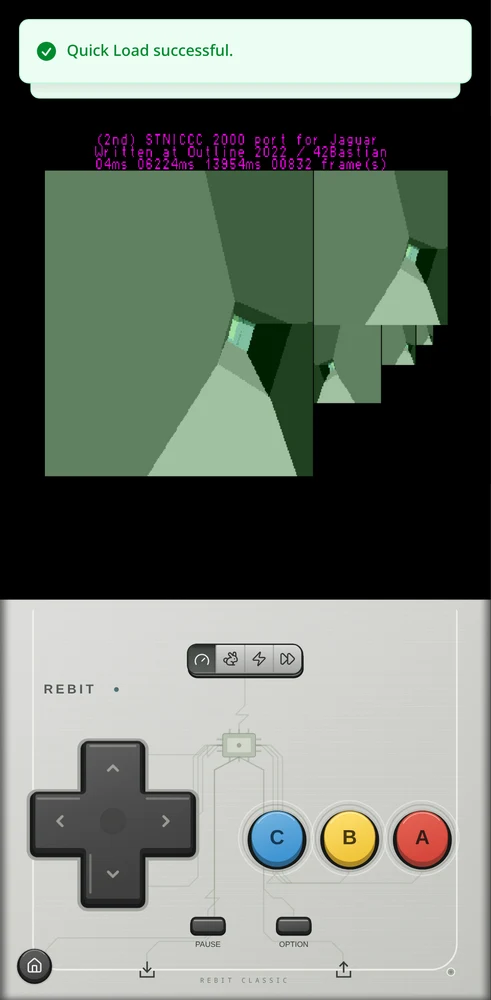
Authentic C-B-A pad + Pause/Option & gamepad 0–4On-screen buttons match the real Jaguar pad (C, B, A plus Pause and Option). Connected gamepads map X, L, R, L2, and R2 to keypad keys 0–4.
60 fps target, automatic EEPROM saves & stream roomsCartridge EEPROM saves upload automatically alongside quick save states. Runs at 60 fps—heavy 3D titles may be demanding on older phones. Online multiplayer uses stream rooms only (no lockstep).
64-bit cartridges. Zero BIOS setup.
Atari Jaguar emulator questions
Do I need an Atari Jaguar BIOS file to play on Rebit?
No. Virtual Jaguar on Recore has the Jaguar boot built in—just upload your own cartridge backup and launch.
Are Atari Jaguar CD games supported?
No. Rebit supports Atari Jaguar cartridge dumps (.j64, .jag, plus .abs, .cof, .rom, and .bin when Atari Jaguar is selected), not Jaguar CD discs.
How do controls, performance, and multiplayer work?
On-screen controls provide C, B, A, Pause, and Option like the real controller, while gamepads map X, L, R, L2, and R2 to keypad 0–4. Virtual Jaguar targets 60 fps, though heavy 3D games may be demanding on older phones. Multiplayer uses stream rooms only (no lockstep).
How are Atari Jaguar saves stored?
Cartridge EEPROM saves upload automatically to your Rebit cloud library, and quick save/load states work across desktop browsers and phone apps.
Related guides
Other systems
Play your Atari Jaguar library
Open Rebit and add a .j64 or .jag cartridge backup you own. Start free and upgrade only when your library grows.