Recore · FreeIntv
Play Intellivision games online
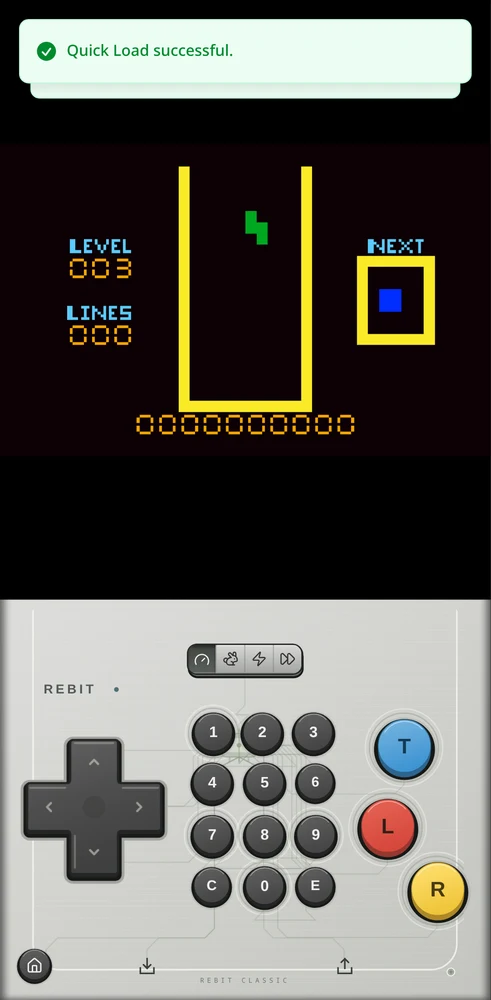
Run your own Mattel Intellivision (.int, .bin, and .rom) cartridge backups in a browser or on your phone—powered by FreeIntv on Recore with the Executive ROM and GROM BIOS built in, a full 12-key on-screen keypad plus three side buttons, smart gamepad keypad mapping, and quick save/load states.
Upload .int (auto-detected) or pick Intellivision (Mattel group) for .bin/.rom — Executive ROM + GROM built in. Rebit supplies no games.
- Core & BIOS
- FreeIntv on Recore · Executive ROM + GROM built in
- Files & Picker
- .int (auto) · .bin/.rom (pick Intellivision, Mattel)
- Controls & Status
- 12-key keypad + 3 side buttons · solo only (no netplay yet)
From .int cartridge backup to keypad play
Bring your own legally dumped .int, .bin, or .rom file.
-
01
Upload your .int, .bin, or .rom
Rebit auto-detects .int files automatically. For .bin or .rom dumps, select Intellivision under the Mattel group in the upload picker.
-
02
Boot straight in—no BIOS files needed
FreeIntv on Recore includes the Intellivision Executive ROM and GROM automatically on desktop browsers and phone apps (from OTA v2.1.240).
-
03
Use the 12-key keypad, disc & save states
Play with the on-screen 1–9/Clear/0/Enter keypad, top/left/right side buttons, and D-pad disc—or a gamepad with built-in keypad mapping—plus quick save/load states.
Recore + FreeIntv
Built-in Executive ROM & GROM, full 12-key keypad + 3 side buttons, and gamepad mapping
Rebit runs Mattel Intellivision cartridges on Recore with FreeIntv across desktop browsers and phone apps (from OTA v2.1.240). Rebit provides the Intellivision BIOS (Executive ROM + GROM) automatically, puts the classic 12-key numeric keypad and three side action buttons right on screen, and maps the whole keypad cleanly onto modern gamepads.
Built-in BIOS + .int, .bin, .rom uploadsRebit supplies the Executive ROM and GROM automatically. Drop .int files for auto-detection, or pick Intellivision under the Mattel group for .bin and .rom dumps.
On-screen 12-key keypad + 16-direction discTap 1–9, Clear, 0, and Enter plus the top, left, and right side buttons directly on screen—with the D-pad driving the 16-direction disc. Keeping a reference of your game’s original keypad overlay helps for complex titles.
Gamepad keypad mapping + quick save statesControllers map keys 1–5 to X/L/R/L2/R2, 7–0 to the right stick, Clear to Select, Enter to Start (with 6 bindable)—plus quick save/load states.
16-direction disc. 12-key keypad.
Intellivision emulator questions
Do I need to upload the Intellivision Executive ROM or GROM BIOS?
No. Rebit provides both the Executive ROM and GROM automatically—just upload your .int, .bin, or .rom game file and play.
Which file formats work for Intellivision on Rebit?
Rebit supports .int (auto-detected), plus .bin and .rom dumps when you choose Intellivision under the Mattel group in the upload picker.
How do the 12-key keypad and overlays work on phones and gamepads?
Touchscreens show the full 1–9, Clear, 0, and Enter keypad plus the top, left, and right side buttons, while the D-pad acts as the 16-direction disc. Gamepads map keys 1–5 to X/L/R/L2/R2, 7–0 to the right stick, Clear to Select, Enter to Start, with 6 bindable. Because the on-screen keys show numbers, keeping a reference of your game’s original overlay helps.
Are Intellivision netplay rooms available yet?
Not yet—online netplay rooms are not available for Intellivision right now. Solo play with quick save/load states is live on web and mobile apps.
Related guides
Other systems
Play your Intellivision library
Open Rebit and add an .int, .bin, or .rom backup you own. Start free and upgrade only when your library grows.