blueMSX
Play MSX & MSX2 games online
From Konami’s legendary MSX2 cartridge catalog—Metal Gear, Nemesis / Gradius 2, Space Manbow, Vampire Killer, Penguin Adventure, The Maze of Galious, King’s Valley, and Knightmare—to thriving modern homebrew, Rebit runs your own MSX and MSX2 cartridges at 60 fps in a browser or on your phone.
Upload your own .mx1, .mx2, or .rom cartridge backup — runs on open C-BIOS (no BIOS upload needed). Cartridges only; .dsk and .cas are not supported yet.

- Core & BIOS
- blueMSX · open C-BIOS built in
- Files
- Cartridges only (.mx1, .mx2, .rom)
- Controls & Netplay
- Joystick + MSX keyboard · Stream rooms only
From MSX cartridge to 60 fps play
Bring your own MSX/MSX2 cartridge dump or open-source homebrew release.
-
01
Upload a .mx1, .mx2, or .rom cartridge
Files ending in .mx1 and .mx2 auto-detect as MSX. For a .rom cartridge, pick MSX in the upload menu. Disk (.dsk) and cassette (.cas) images are not supported yet.
-
02
Boot directly on open C-BIOS
blueMSX launches at 60 fps in desktop browsers and phone apps (from OTA v2.1.233) with zero BIOS files to supply.
-
03
Use joystick, SPC, F1, or the MSX keyboard
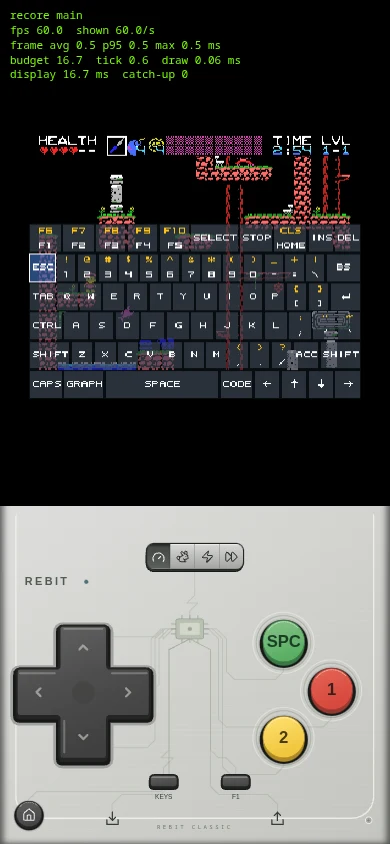
Type straight in on desktop keyboards, or tap Keys on mobile to open the full on-screen MSX keyboard—with cloud save states synced across devices.
Joystick & full MSX keyboard
SPC, F1, Fire 1 & 2—plus an on-screen MSX keyboard
MSX cartridges love mixing joystick play with keyboard shortcuts like Space to fire or start, F1 to pause, and F2–F5 for equipment menus. On desktop, your physical keyboard types straight into the MSX. On phones, Rebit gives you the joystick, Fire 1 & 2, dedicated SPC and F1 buttons, plus a Keys button that opens a full MSX keyboard drawn right on screen.
On-screen MSX keyboardTap Keys to bring up the full MSX keyboard and navigate keys with the D-pad whenever a cartridge asks for a letter or function key.
Desktop keyboard pass-throughYour physical keyboard types straight into blueMSX—no extra setup needed for Metal Gear’s radio or menu shortcuts.
Open C-BIOS built inRebit runs blueMSX on the free, open C-BIOS, so you never have to hunt down proprietary MSX ROMs.
Konami’s golden era. No BIOS hunt.
MSX & MSX2 emulator questions
Do I need MSX or MSX2 BIOS files?
No. Rebit runs blueMSX on the free, open C-BIOS automatically, so your cartridge backups boot with no BIOS upload required.
Can I upload MSX floppy disk (.dsk) or cassette (.cas) games?
Not yet. Rebit currently supports MSX and MSX2 cartridge images only: .mx1 and .mx2 auto-detect, and .rom files work when you select MSX in the upload menu.
How do MSX keyboard keys like Space, F1, or F2 work on a phone?
Rebit’s on-screen controls include dedicated SPC (Space) and F1 buttons alongside the joystick and Fire 1 & 2—plus a Keys button that opens a full MSX keyboard drawn on screen (navigated with the D-pad). On desktop, your physical keyboard types straight into the MSX.
Is online multiplayer supported for MSX games?
Yes via Stream rooms only: the host runs the MSX cartridge locally and a friend watches or sends controller inputs.
Related guides
Other systems
Play your MSX & MSX2 library
Open Rebit and add an .mx1, .mx2, or .rom cartridge backup you own. Start free and upgrade only when your library grows.