Knowing your Atari ROM formats prevents the single most common upload hiccup across classic Atari libraries: generic .bin files. Because Atari 2600, 5200, and 7800 dumps—plus Sega Genesis cartridges—were all historically saved as .bin, a plain filename does not tell an emulator which machine the cartridge belongs to. Using each system's dedicated extension makes uploading to Rebit's Atari 2600 player and sibling Atari pages effortless.
The four Atari cartridge extensions on Rebit
| System | Preferred extension | Rebit core | Dedicated landing page |
|---|---|---|---|
| Atari 2600 | .a26 (also .bin) |
Stella 2014 | Play Atari 2600 online |
| Atari 5200 | .a52 (also .bin) |
a5200 | Play Atari 5200 online |
| Atari 7800 | .a78 (also .bin) |
ProSystem | Play Atari 7800 online |
| Atari Lynx | .lnx |
Handy | Play Atari Lynx online |
Why .a78 and .lnx headers matter
Atari 7800 cartridges came with wildly different bank-switching chips, on-cartridge Pokey sound chips, and controller requirements. A .a78 file adds a tiny 128-byte header that tells ProSystem exactly how the board is wired. Likewise, .lnx carries the header Handy expects for Atari Lynx cartridges. If you only have a raw headerless .bin for Atari 7800, selecting Atari 7800 manually helps, but a proper .a78 dump is far more reliable.
Quick checklist for clean Atari uploads
- Keep each system's extension intact. Prefer
.a26,.a52,.a78, and.lnxover generic.binwhen backing up your own cartridges or downloading creator-released AtariAge homebrew. - Select the system manually if uploading
.bin. If your backup ends in.bin, choose the matching Atari console in Rebit's uploader so it routes straight to Stella 2014, a5200, or ProSystem. - Never supply game files you don't own. Rebit runs the emulators and syncs cloud saves, while you supply your own cartridge dumps or free homebrew.
Once your cartridge boots, Atari's console switches work a little differently from NES or SNES pads—read our Atari 2600, 7800, and Lynx controls guide to get past the title screen fast.
Troubleshooting Atari ROM formats and .bin uploads
If you upload a generic .bin file and Rebit does not auto-select the right Atari console, check three things before assuming the dump is bad:
- Pick the exact Atari system in the uploader. Stella 2014 (2600), a5200 (5200), and ProSystem (7800) are completely different cores; a 2600
.binwill not boot on ProSystem. - Prefer headered
.a78for Atari 7800 and.lnxfor Lynx. Both formats embed small metadata headers describing mapper and chip layout so the emulator does not have to guess. - Unzip multi-file homebrew packs. Modern Atari homebrew releases often bundle manuals, box art, and multiple regional builds inside one
.zip—upload the single.a26,.a78, or.lnxcartridge file inside.
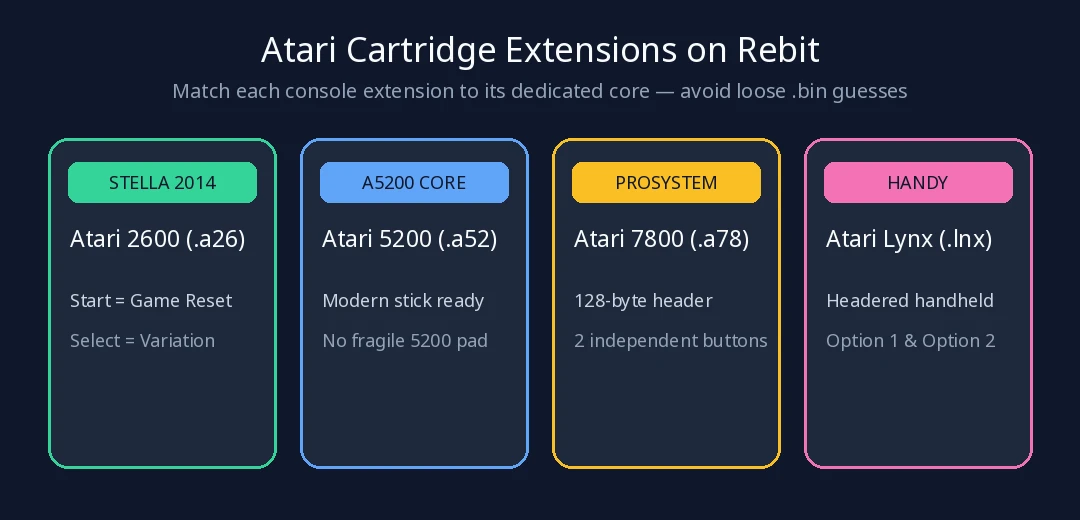 Each Atari system runs on its own dedicated core in Rebit—using .a26, .a52, .a78, and .lnx extensions keeps uploads clean and unambiguous.
Why Atari dumps vary more than NES or SNES ROMs
If you have ever backed up an NES or SNES shelf, you are used to clean, predictable extensions (.nes, .sfc). Atari's hardware spanned more than a decade—from 1977's Atari 2600 through 1989's 16-bit color Atari Lynx—and early dumpers in the 1990s saved raw ROM chips from all three home consoles as plain .bin files.
That creates two real-world gotchas when organizing a personal collection:
- Identical
.binextensions, incompatible hardware: A 4 KB Atari 2600 dump, a 16 KB Atari 5200 dump, and a 48 KB Atari 7800 dump can all end in.bin, yet each targets a completely different CPU memory map and video chip. - Missing mapper metadata on Atari 7800 and Lynx: Standard
.a78and.lnxfiles include a tiny header describing bank-switching, sound chips (like the Atari 7800's onboard Pokey audio chip in Ballblazer and Commando), and screen orientation for vertical Lynx titles like Klax or Gauntlet: The Third Encounter.
Organizing your Atari library across all four systems
Keeping four cleanly named folders on your computer—one each for .a26, .a52, .a78, and .lnx—makes building your Rebit shelf effortless:
- Atari 2600 (
.a26): Best for iconic instant-play classics (Pitfall, River Raid, H.E.R.O., Adventure) and thriving modern homebrew on Play Atari 2600 online. - Atari 5200 (
.a52): Home to crisp early-80s arcade conversions that finally shine with modern controllers on Play Atari 5200 online. - Atari 7800 (
.a78): Arcade-faithful hits like Food Fight, Centipede, and Robotron 2084 on Play Atari 7800 online. - Atari Lynx (
.lnx): Hardware sprite-scaling 16-bit handheld classics like Chip's Challenge and California Games on Play Atari Lynx online.
Once your files are uploaded cleanly, check our Atari 2600, 7800, and Lynx controls guide so Game Reset, Game Select, and Lynx Option keys never catch you off guard.