If you want the best NES emulator in 2026, the honest answer depends on how you actually play. For cycle-accurate desktop preservation, ROM hacking, and hardcore tinkering on Windows, macOS, or Linux, Mesen is the undisputed king. For zero-install cross-device play with automatic cloud saves and 2-player online netplay across your browser, phone, and desktop, Rebit (powered by FCEUmm) is the easiest way to jump in and never lose a run. And if you want a lightweight standalone desktop alternative, PuNES and Nestopia UE still hold their own.
I have been playing NES games since the days of blowing into gray cartridges, wiggling the 72-pin connector until the blinking red light finally went solid, and leaving the console running overnight because Super Mario Bros. 3 didn’t have a battery save. When you spend enough years replaying Castlevania III, Ninja Gaiden, and Gimmick!, you quickly realize something that casual "top 5 emulator" lists gloss over: the NES is deceptively hard to emulate well.
On paper, it is an 8-bit 6502 CPU running at 1.79 MHz. In reality, it is a wild ecosystem of over 300 cartridge mappers, mid-scanline PPU tricks, expansion audio chips soldered inside Japanese Famicom carts, and analog NTSC video artifacts that developers intentionally used to blend pixels together. Pick the wrong emulator—or leave the wrong default settings on—and Battletoads freezes on Stage 2, Mike Tyson’s Punch-Out!! feels a hair too sluggish to dodge Piston Honda’s uppercut, or Akumajou Densetsu loses its glorious extra bass and square channels.
Let’s break down the best NES emulators available right now from a player’s perspective: what each one actually nails, where it trips up, and how to dial in your setup so your favorite 8-bit games feel as crisp as they did on a Sony Trinitron.
Quick comparison: the best NES emulators in 2026
| Emulator | Best For | Platforms | Accuracy & Mapper Support | Cloud Saves & Netplay |
|---|---|---|---|---|
| Mesen (v2) | Purists, speedrunners, HD texture packs, ROM-hack devs | Windows, macOS, Linux | Cycle-accurate gold standard; massive mapper & FDS coverage | Local saves; built-in desktop netplay (manual IP/port) |
| Rebit (FCEUmm) | Instant browser + phone + desktop play with zero config | Web browser, Android, iOS, Desktop | Battle-tested FCEUmm core; huge retail + hack/homebrew library | Built-in cloud autosaves, .sav export, 2P Rollback/Lockstep/Stream room-code netplay |
| PuNES | Standalone desktop players who want great CRT shaders out of the box | Windows, Linux, BSD | Very high PPU/APU accuracy; great PAL/NTSC handling | Local saves; no built-in netplay |
| Nestopia UE | Older PCs, RetroArch users wanting a clean, faithful core | Windows, macOS, Linux, RetroArch | High accuracy, clean NTSC filter, slightly narrower exotic mapper list than FCEUmm | Local saves (or RetroArch netplay) |
| Delta | Offline single-player NES on iPhone/iPad | iOS, iPadOS | Solid Nestopia-based core for mainstream retail titles | Optional Google Drive/Dropbox sync; no online NES netplay |
Why NES emulation is trickier than people think
Before picking a winner, it helps to know what actually separates a great NES emulator from a mediocre one. If you only ever boot Super Mario Bros. (NROM, mapper 0), almost anything from 1998 will run it. The cracks show up when you dig into the deeper half of the library.
1. Cartridge mappers (the secret sauce of the NES)
The base NES hardware was ridiculously constrained—only 32 KB of program ROM and 8 KB of tile graphics. To keep the console alive for nearly a decade, Nintendo and third-party studios put custom silicon inside the cartridges themselves, called mappers:
- MMC1 (The Legend of Zelda, Metroid, Mega Man 2): Added bank switching and battery-backed WRAM so RPGs could finally save your quest.
- MMC3 (Super Mario Bros. 3, Kirby’s Adventure, Mega Man 3–6): Added a scanline IRQ counter. That’s how Mario 3 keeps a rock-steady status bar at the bottom while the level scrolls diagonally above it. If an emulator’s IRQ timing is even a few PPU cycles off, that split line jitters or glitches.
- MMC5 (Castlevania III: Dracula’s Curse, Just Breed): Nintendo’s monster chip—extra audio channels, expanded background attributes (letting single 8×8 tiles use their own palettes instead of 16×16 blocks), and vertical split-screen scrolling. Cheap browser emulators routinely choke on MMC5.
- VRC6 & Sunsoft 5B (Akumajou Densetsu, Lagrange Point, Gimmick!): Japanese Famicom carts that literally wired extra sound synthesizers into the audio path. Playing Gimmick! or the Japanese version of Castlevania III with proper expansion audio enabled is a religious experience for chiptune fans.
2. The NES color palette myth
Here is one of my favorite retro-hardware rabbit holes: the NES does not output RGB colors. Its Picture Processing Unit (the 2C02) generates a composite NTSC signal directly using square waves shifted in phase. Every television in the 1980s decoded those phases slightly differently depending on the TV’s hue, tint, and demodulation matrix.
That is why Super Mario Bros.’s sky looks powdery periwinkle on one emulator, deep cornflower blue on another, and borderline purple on a third. Good emulators (like Mesen and FCEUmm) let you stick with a balanced composite-derived palette—like FirebrandX’s Smooth or Sony CXA—instead of the overly neon, eye-searing RGB palettes that made early 2000s emulators look harsh.
3. Input latency and the 60 Hz muscle-memory test
If you grew up playing Mike Tyson’s Punch-Out!! or Ninja Gaiden, your thumbs have 16-millisecond timing baked into them. Bald Bull’s charge, Tyson’s 0:00–1:30 uppercuts, and the infamous Stage 6-2 bird jumps in Ninja Gaiden become unfairly punishing if your emulator + display chain adds 4–5 frames of input lag. That is why low-latency audio/video pipelines, wired or low-latency Bluetooth controllers, and optional shaders that don’t tank frame pacing matter way more than flashy menus.
Deep dive: the best NES emulators, ranked by how you play
1. Mesen — Best standalone desktop NES emulator
If you sit at a Windows, macOS, or Linux PC and care about absolute hardware fidelity, Mesen (specifically Mesen 2, the unified multi-system rewrite) is the benchmark everything else is measured against.
Why retro enthusiasts love it:
- Hardware-grade accuracy: Mesen passes virtually every notorious NES test ROM—Battletoads Stage 2 sprite-0 hit timing, Micro Machines mid-frame palette swaps, Young Indiana Jones Chronicles glitches, and obscure Famicom Disk System titles all run like real silicon.
- Expansion audio & overclocking: You can tweak individual Famicom expansion channels, remove the 8-sprites-per-scanline flicker limit (a godsend in Mega Man and Contra when bosses fill the screen), or mildly overclock the CPU to eliminate slowdown in Kirby’s Adventure and Gradius II.
- Run-Ahead latency reduction: On a fast desktop PC, Mesen can speculatively run a frame or two ahead under the hood, shaving off internal game/emulator lag so Punch-Out!! feels eerily close to a CRT.
- HD Packs & debugging tools: If you ever want to try community HD sprite packs, or you’re curious how Super Mario Bros. 3 streams nametables in real time, Mesen’s PPU viewer and tilemap inspector are unmatched.
Where Mesen falls short: It is strictly a local desktop app. There is no mobile version, no automatic cloud save syncing between your laptop and phone, and online netplay requires manual port forwarding or VPN tunneling—which is a fast way to kill a spontaneous Friday-night Super C session with a friend.
2. Rebit (FCEUmm) — Best NES emulator for browser, cross-device cloud saves, and online netplay
Most browser-based NES sites are a mess: sketchy pop-up ads, stolen ROM hosting, janky JavaScript cores that drop frames on MMC3 games, and saves trapped in localStorage that vanish the moment you clear your cache.
When we built Rebit’s NES emulator online, we took the opposite approach: run the battle-tested FCEUmm core directly in your browser and native Android/iOS/desktop apps, pair it with real cloud saves, and make 2-player online netplay as simple as sharing a room code.
Why FCEUmm + Rebit works so well for actual playthroughs:
- Massive real-world compatibility: FCEUmm has decades of community fixes behind it. Retail
.nes(iNES / NES 2.0) carts, tricky mappers like MMC3 and MMC5, fan translations (Mother, Sweet Home, Final Fantasy III), and modern NES homebrew all boot cleanly with zero BIOS files. - Cloud autosaves that save you from NES-era heartbreak: Half the NES library—Super Mario Bros. 3, Contra, Ninja Gaiden, Castlevania, Blaster Master—never had battery saves. On Rebit, your session autosaves to the cloud every minute on the free plan (every 10 seconds on Pro), alongside manual save states and exportable
.savbattery files for RPGs like The Legend of Zelda and Dragon Warrior. Start World 4 on your desktop, finish it on your phone on the bus, and never lose progress. - 2-player NES netplay without port forwarding: Classics like Super C, Double Dragon II, River City Ransom, Bubble Bobble, and TMNT III were born for couch co-op. Rebit lets you host a room straight from the in-game menu using Rollback (instant local feel for action games), Lockstep (steady fallback for uneven connections), or Stream (where only the host needs the
.nesfile). P2P is free, and Edge Link (Pro) routes through Rebit’s network when strict Wi-Fi or CGNAT blocks direct peer-to-peer. - CRT shaders & RetroAchievements: Turn on CRT shaders to bring back scanlines and phosphor warmth, link your RetroAchievements account to chase mastery badges, and pair any Bluetooth/USB controller (Xbox, PlayStation, Switch Pro, 8BitDo) or launch Big Picture mode for couch play.
If you want a step-by-step walkthrough for uploading your own .nes dump, importing an existing .sav, and hosting your first co-op room, read our NES emulator online ROM and netplay guide.
3. PuNES — Best lightweight alternative for CRT lovers on desktop
PuNES flies under the radar compared to Mesen, which is a shame because its accuracy is right up there in the top tier. It runs natively on Windows and Linux, boots fast, handles PAL/NTSC/Dendy timing cleanly, and ships with a lovely built-in NTSC composite filter and CRT shader presets that require zero RetroArch menu-diving.
If you want a clean, single-purpose desktop emulator for offline solo sessions—and Mesen’s huge multi-system menus feel like overkill—PuNES is a joy to use.
4. Nestopia UE — Best for low-spec hardware and RetroArch setups
Nestopia Undead Edition (UE) is the community-maintained continuation of the classic Nestopia emulator. It is famously light on CPU, includes Blargg’s beloved NTSC composite video filter (which authentically reproduces dot crawl and color bleeding), and works great as a RetroArch core on older laptops, Raspberry Pis, or Linux handhelds.
The main trade-off compared to Mesen and FCEUmm is mapper coverage for newer NES homebrew and unusual ROM hacks: Nestopia relies heavily on an internal XML database, so obscure or newly patched .nes files occasionally refuse to boot when FCEUmm runs them without blinking.
5. Delta — Best offline NES option on iPhone
If you are strictly on iOS and want an offline-only single-player emulator from the App Store, Delta wraps a clean Nestopia core inside a polished touch interface with custom skins. It is great for solo Mega Man 2 on a flight—just keep in mind there is no browser/desktop web client and no online NES netplay if you want to play co-op with a friend on PC or Android.
CRT shaders vs raw pixels: how NES art was actually meant to look
One of the quickest ways to make any NES emulator look twice as good is understanding why raw, razor-sharp square pixels sometimes look worse than you remember.
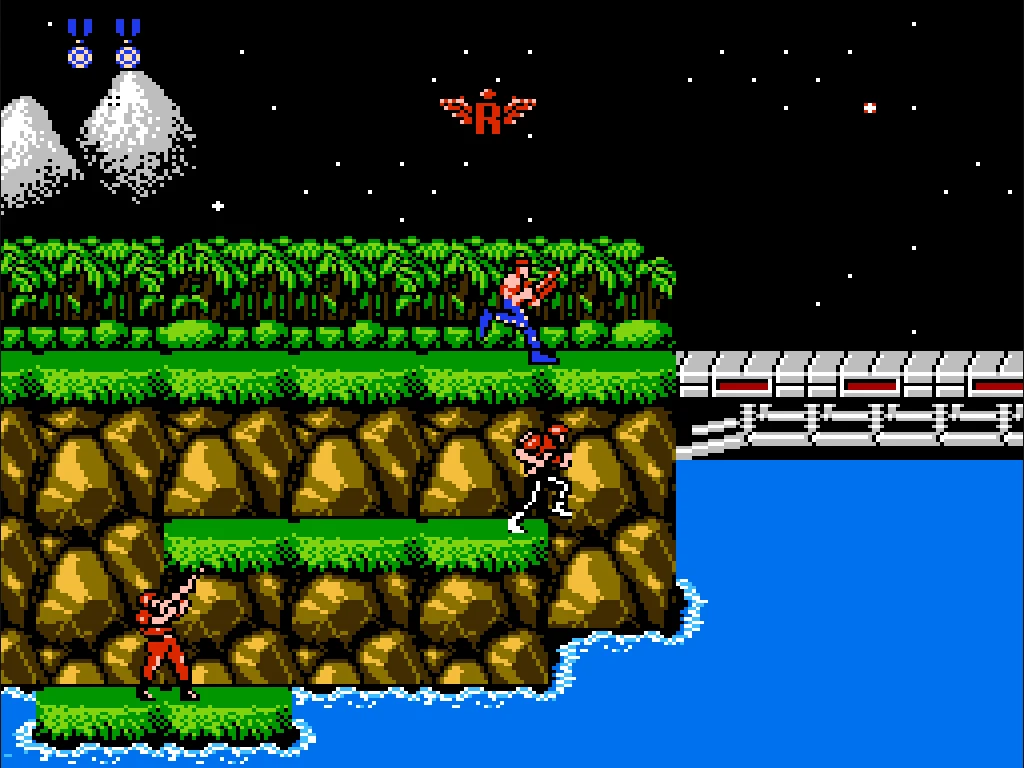
Back in 1988, pixel artists at Konami, Capcom, and Sunsoft didn’t draw for 4K OLED screens. They drew for curved shadow-mask CRTs with soft composite bleed and horizontal scanlines. They used alternating vertical stripes (dithering) knowing a CRT would blur them into gradients, extra colors, and semi-transparent water or shadows.
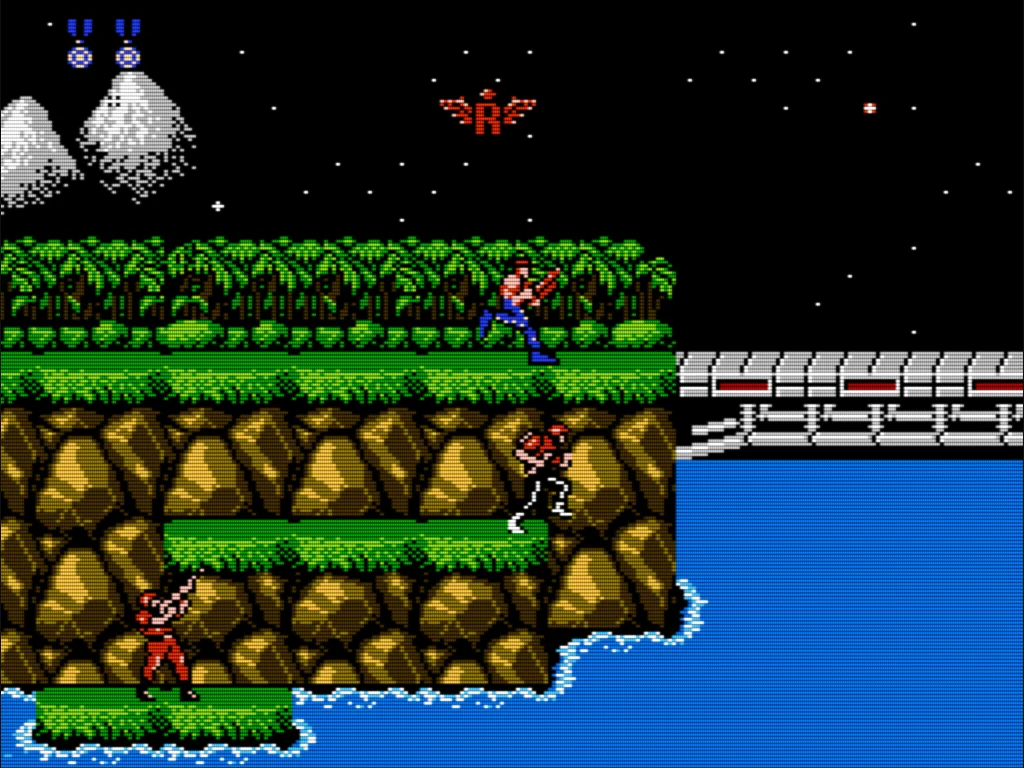
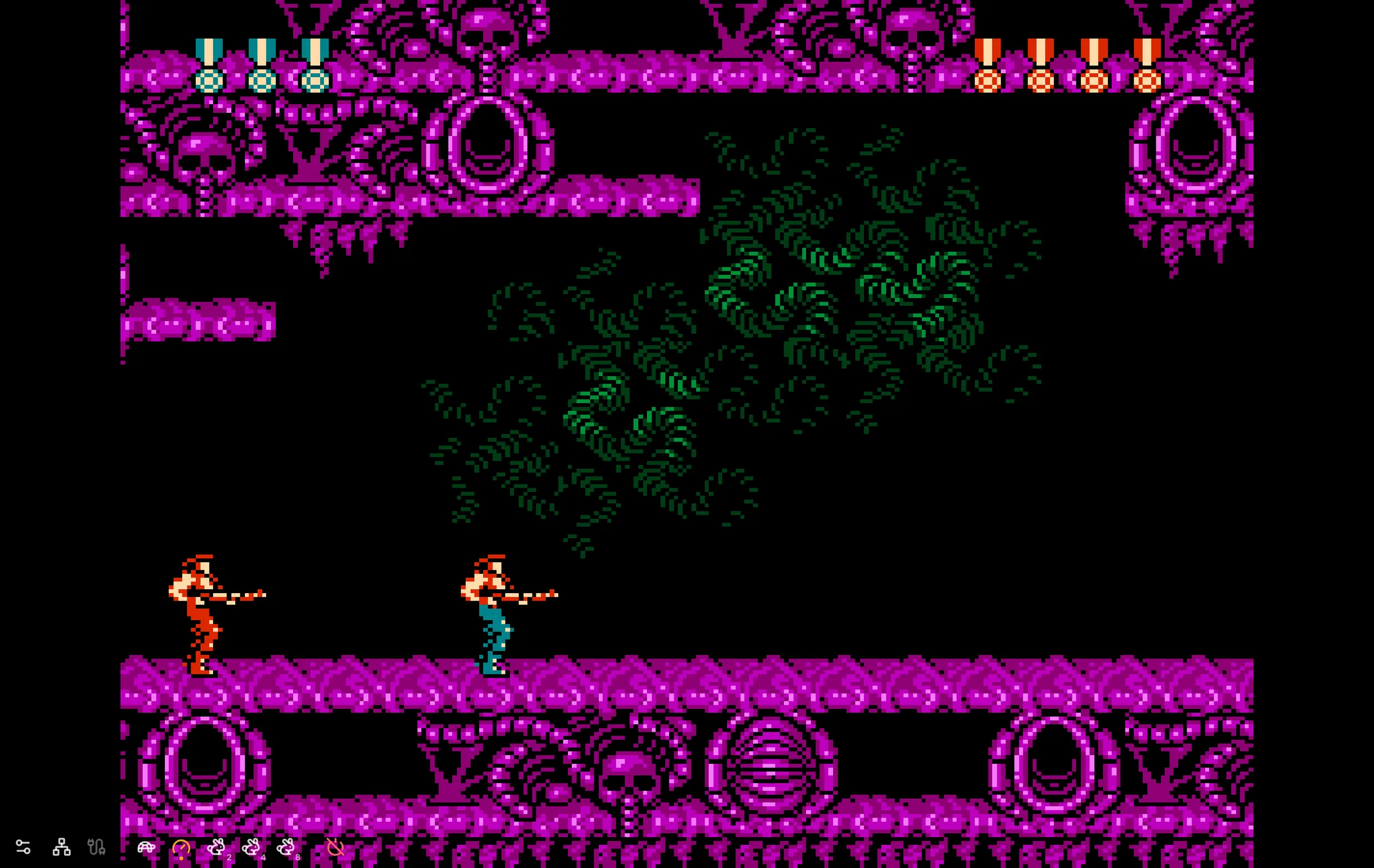
Look at the difference on Contra: with a Classic CRT shader enabled, the scanlines restore the contrast and depth of the jungle foliage, the harsh jagged edges on the sprites soften naturally, and the whole frame suddenly looks like a cohesive painting instead of Lego bricks. My personal rule: keep raw pixels if you’re capturing crisp screenshots or playing on a tiny phone screen in bright sunlight, and flip on a CRT shader the second you play on a monitor or TV.
Choosing the right NES netplay mode for co-op nights
If you are picking an NES emulator specifically to replay classics with a friend online, don’t just look at whether "netplay" is checked on a feature matrix—look at how it handles latency and ROM matching.
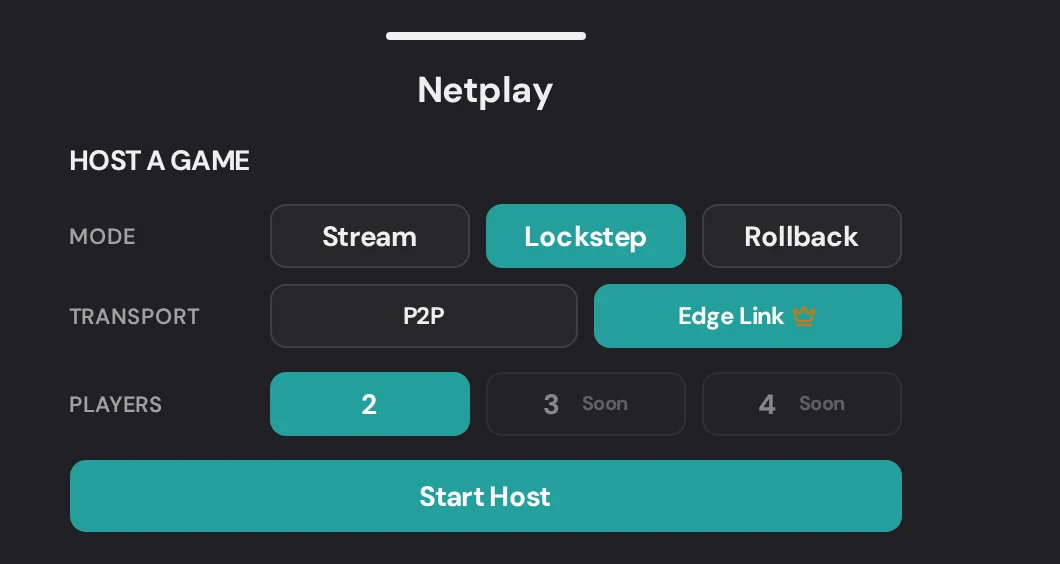
- Rollback is the gold standard for fast NES action (Super C, TMNT III, Chip ’n Dale Rescue Rangers). Your own jumps and shots respond with zero added delay while the emulator silently reconciles Player 2’s inputs. Both players must load the exact same
.nesROM (matching region and revision). - Lockstep keeps both screens strictly synchronized by adding a tiny shared input delay. It’s a lifesaver if one player is on shaky Wi-Fi where Rollback would cause visual jitter.
- Stream lets the host run the game and stream video/audio to Player 2—perfect for spontaneous sessions because only the host needs the ROM file.
Need a shortlist of games that still slap in two-player online co-op? Check out our picks for the best NES co-op games to play online with friends.
Common NES ROM & save headaches (and quick fixes)
Even with the best NES emulator, a few classic file quirks trip players up:
- Black screen or "invalid header" on boot: Standard
.nesfiles start with a 16-byte iNES (NES\x1a) or NES 2.0 header telling the emulator which mapper and mirroring mode the cartridge uses. Raw headerless dumps or corrupted archives won’t boot. If your.nesis inside a.zipalongside readme text files or multiple region variants, extract the single.nesfile you want and load it directly. - PAL vs NTSC speed mismatch: European (PAL) NES games run at 50 Hz instead of 60 Hz. Many early PAL ports (like the original Super Mario Bros.) had slower music and physics unless specifically optimized. Unless you have nostalgia for a specific PAL release, stick to NTSC (USA or Japan) dumps for the intended 60 fps tempo.
- Battery saves (
.sav) vs save states: Save states are emulator-specific snapshots—a state saved in Mesen won’t load in FCEUmm or Nestopia. Cartridge battery saves (.sav), on the other hand, are raw SRAM dumps that work across almost every NES emulator. Whenever you finish a session of The Legend of Zelda, Final Fantasy, or Crystalis, save at an in-game checkpoint too so your.savstays portable forever.
Frequently asked questions
What is the most accurate NES emulator?
Mesen is currently the most cycle-accurate NES emulator on desktop, passing virtually all hardware test ROMs and supporting rare Famicom mappers and expansion audio. For browser and mobile play with cloud saves and room-code netplay, FCEUmm (used in Rebit) offers the best mix of high compatibility, speed, and cross-device convenience.
Do I need BIOS files to run an NES emulator?
No. Standard NES cartridges (.nes) do not require a console BIOS file. Only Famicom Disk System (.fds) games require a separate FDS BIOS. Remember that Rebit never supplies or links to ROMs or BIOS files—always use dumps of games you own.
Which NES emulator is best for playing with friends online?
For hassle-free 2-player co-op without router port forwarding, Rebit is the simplest choice: open a .nes game you own in your browser or mobile app, pick Rollback, Lockstep, or Stream, and send your friend a room code. Free accounts get P2P netplay and 2 GB of cloud storage, while Pro adds Edge Link relay routing for tricky networks.
Can I transfer my .sav file from Mesen or RetroArch to Rebit?
Yes. As long as it is a standard cartridge battery save (.sav) rather than an emulator-specific save state, you can upload your .nes ROM to your Rebit library, attach your .sav on the game’s page, and continue right where you left off on desktop or mobile.
Ready to test your favorite 8-bit cartridge right now? Head over to Rebit’s play NES games online page or launch Rebit, drop in a .nes file you own, and play with cloud autosaves and CRT shaders in seconds.