You and a friend have picked a game, opened it on two devices, and found a multiplayer button. Yet one of you wants to join a co-op adventure while the other is staring at a trading menu. Both count as multiplayer—but they ask the emulator to do different jobs.
To play retro games online with friends, start with the connection the game expects. A console game built for two controllers needs a different setup from a handheld game built for two linked machines. A phone acting only as a controller is a third situation.
Here is how to choose the right Rebit feature before spending the evening troubleshooting the wrong room.
Choose by what each player needs
| Your goal | Start here | What to check first |
|---|---|---|
| Play a supported console game's multiplayer mode from separate devices | Netplay | The game actually has the multiplayer mode you want |
| Connect compatible Game Boy, Game Boy Color, or GBA games | Link Cable | The game supports that link interaction and the builds are compatible |
| Use a phone to press buttons for a game on another screen | Remote Controller | The other device is running the game; the phone is only an input device |
| Play a Nintendo DS multiplayer game | Nintendo DS Cloud Rooms | Follow the DS-specific setup rather than the GBA instructions |
Rebit's multiplayer documentation separates these paths. In particular, regular Netplay is not the route for GB, GBC, or GBA games. If you opened a handheld game and cannot find the regular Netplay option, check Link Cable before assuming something broke.
Netplay: think about the original controller ports
Imagine a console game where Player 1 and Player 2 would have plugged controllers into the same machine. They might share a scrolling stage, compete on a split screen, or take alternating turns. The game's own multiplayer rules determine which of those happens.
That is the useful starting point for understanding ordinary retro netplay: you want access to an existing multiplayer mode from separate devices. The word “online” does not add a second character to a game that never supported one.
Before creating a room, answer two questions:
- Does this exact game have simultaneous multiplayer, or does its two-player option alternate turns?
- Can you reach that mode from the title screen, or must someone progress through the game first?
This saves an easy misunderstanding. A friend waiting for their turn is different from a friend whose controller is disconnected. Check the game mode before changing network settings.
In Rebit's Netplay setup, Internet is the relevant choice when friends are in different places. LAN is for the same local network. Being connected to Wi-Fi in two different houses does not put the devices on the same LAN.
GBA Link Cable: think about separate handhelds
A linked handheld session connects games that have their own running state. In a supported Pokémon trade, for example, each player brings their own trainer and party. Giving somebody another controller for your trainer would not provide the second game needed for that exchange.
Rebit uses Link Cable for compatible handheld link features. Its documented room sizes are two players for GB/GBC and two, three, or four for GBA. Those are room capacities: selecting four seats does not make every GBA game support four players.
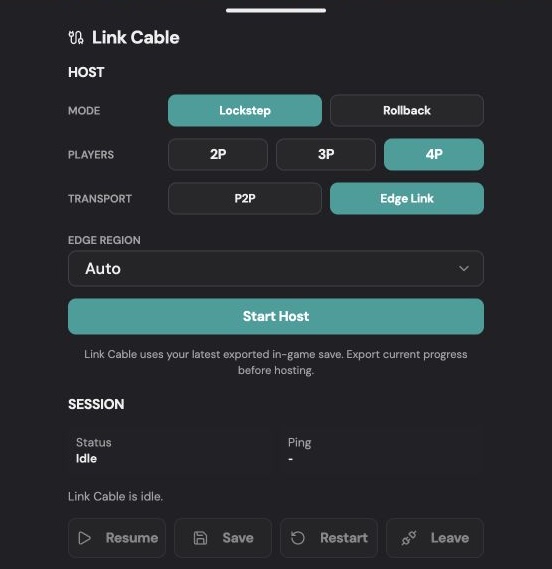
The Link Cable host panel. Choose the multiplayer type first; transport and timing options come afterward. This image shows the interface, not a compatibility test for a particular game.
There are two separate milestones in a linked session:
- The room connects. Rebit has established the session between players.
- The game links. Everyone enters the appropriate in-game trade, battle, race, or co-op flow, and it works as expected.
Reaching the first milestone does not prove the second. A room can connect while the players are using incompatible releases or different in-game menus.
For an initial test, use the same game revision where appropriate. Some games are designed to link with a different companion version, so “same file” is not a universal rule for every trade. Check the game's actual requirements. For ROM hacks, record the release number rather than relying on a renamed filename.
The Link Cable guide covers room setup. Use your own legally obtained game files; Rebit does not supply copyrighted ROM downloads.
Does a Pokémon trade mean shared-world co-op?
No. Trading, battling, and exploring a world together are different game features.
If your goal is “my friend and I each control a trainer and walk around together,” confirm that the particular game and release support that behavior. A link-capable emulator cannot turn a game's trade counter into a cooperative story mode.
For Quetzal, use the dedicated Pokémon Quetzal online co-op guide. It explains the room and in-game steps for that use case. Do not assume its instructions or multiplayer behavior transfer unchanged to every Emerald-based hack.
Remote Controller: the phone supplies buttons
Suppose the game is on your laptop or a larger display, and you want your phone to provide the controls. You do not need to create a second handheld adventure just to move the character on that screen.
Rebit's Remote Controller makes the phone an input device for the game running elsewhere. It does not, by itself, create another player character, trainer, save file, or linked game session.
This distinction is especially useful when arranging a game night. Ask your friend whether they want to control the game on your screen or join with their own running game. The answer determines which setup instructions to send them.
Follow the Remote Controller instructions for pairing through the displayed QR code or room code.
Diagnose the mismatch before the connection
If the session does not behave as expected, identify the earliest thing that failed.
| What you see | What to check next |
|---|---|
| Your friend can press buttons, but has no separate trainer | Check whether you paired Remote Controller when you needed Link Cable |
| A GBA game has no ordinary Netplay option | Look for Link Cable; this is the documented handheld route |
| Everyone is connected, but a trade never begins | Check compatible builds and the matching in-game link menus |
| Two players connect, but only one acts at a time | Check whether the game uses alternating turns |
| A four-seat room opens, but the game cannot start four players | Check the game's player limit and supported mode |
| Friends in different houses cannot use LAN together | Choose the Internet path for regular Netplay |
Once the feature and game mode are correct, investigate connection quality. Trying different network options cannot fix a game that lacks the multiplayer feature you expected.
Make the first session a small proof
Before committing to a long adventure, agree on the game release, multiplayer activity, and number of players. Confirm that each person can launch their game and reach the relevant menu. Then test one short round or a harmless interaction.
For linked games with persistent progress, preserve each player's in-game save before experimenting and check the current room's save controls. Do not assume a private save state can be loaded into a synchronized group session, or that closing a tab completes a save.
A successful first test answers three practical questions: can everyone join, does each person's input do what they expect, and does the game perform the intended multiplayer action?
When those answers are clear, you are ready to play retro games online with friends—with the right kind of room from the start.