How to Play Pokemon Quetzal Online Co-op With Friends
Pokemon Quetzal is a fan-made GBA ROM hack known for letting multiple trainers explore its world together. Rebit can connect compatible GBA games through a private Link Cable room, so you and your friends can try Quetzal co-op from separate browsers instead of running several emulator windows on one computer.
The short version: every player adds the same compatible Quetzal build to their own Rebit library and exports the correct in-game save. The host creates a GBA Link Cable room from the game. Guests open Rebit's Netplay tab, find that room, tap Join, and choose Quetzal from their library.
Rebit does not provide Pokemon Quetzal, Pokemon Emerald, ROM files, or patches. Use a game backup you are legally allowed to use and a patch obtained from the project author's official source. This guide covers only the Rebit multiplayer setup.
Can you play Pokemon Quetzal online?
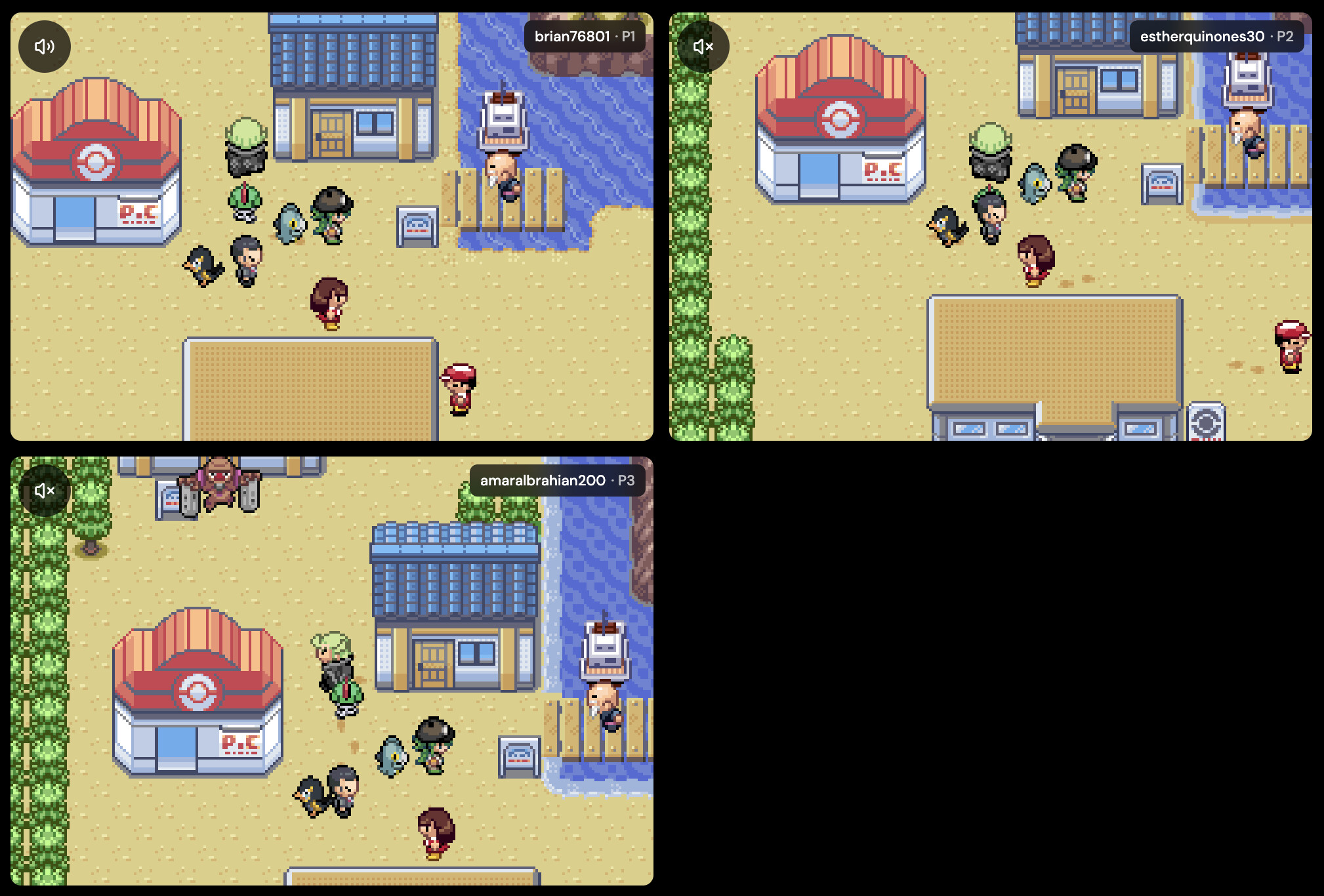
Yes, you can try Pokemon Quetzal online multiplayer when every player has a compatible copy and the emulator environment can connect multiple GBA sessions. On Rebit, that connection is handled through a GBA Link Cable room. Each trainer plays on their own device, receives a separate player seat, and uses Quetzal's multiplayer option after the room is connected.
This is different from streaming one person's screen. Rebit does not send a video of the host's game or give guests remote control of the host's computer. It runs the connected game sessions and carries the link data between them.
It is also important to separate three meanings of “play Quetzal online”:
| What you want to do | Correct Rebit path |
|---|---|
| Play your own Quetzal adventure in a browser | Add your legal GBA file to your library and launch it |
| Explore Quetzal together from separate devices | Host through the in-game Link Cable panel; guests join from the Netplay tab |
| Trade or battle through a supported in-game feature | Join the Link Cable room from Netplay, then use the matching menu inside the game |
Rebit supplies the browser play and room connection, not the game. Multiplayer support ultimately depends on the particular Quetzal release you use.
What every player needs
Before creating a room, check that everyone has:
- a Rebit account and a supported browser
- their own legally obtained, patched Pokemon Quetzal GBA file
- the same Quetzal version as the other players
- an in-game save that loads correctly
- a stable internet connection
Using the same release matters. Two files can both be called “Pokemon Quetzal” while containing different revisions, fixes, or gameplay data. Mixed versions may fail to connect, behave differently, or desync during play.
Pre-session checklist
Ask every player to finish this checklist before the host creates the real room:
- Launch Quetzal alone and confirm it reaches the title screen.
- Load the intended save and confirm the trainer, party, location, and progress are correct.
- Save once through Quetzal's normal in-game menu.
- Close and reopen the game to prove the save loads.
- Confirm the Quetzal release name or version with the group.
- Connect a controller, or test the browser controls, before joining.
- Close unnecessary games, video streams, downloads, and heavy browser tabs.
- Keep an untouched save backup if the playthrough matters.
Do not use “the filenames look similar” as the compatibility test. The files need to represent the same game revision. Rebit can reject a different system family, but it cannot guarantee that two independently modified Quetzal builds contain identical game logic.
If you have not added the game yet, follow Rebit's guide to upload a legally owned game file and play online. Do not share ROM files with the other players; each person should prepare their own lawful copy.
Quick setup: Pokemon Quetzal online multiplayer on Rebit
- Every player adds the same Pokemon Quetzal version to their Rebit library and exports the intended in-game save.
- The host launches Quetzal, opens the in-game Rebit menu, and selects Link Cable.
- Choose the Quetzal player count: 2P, 3P, or 4P.
- Start with Lockstep mode and P2P transport for a nearby two-player session.
- Tap Start Host, then copy the Room Code.
- Send the Room Code to the other players so they can identify the correct room.
- Each guest opens Rebit's Netplay tab and finds the active room with that code, host, and game name.
- The guest taps Join on the room card and chooses Pokemon Quetzal from the eligible GBA games shown.
- Rebit launches the selected game and joins the Link Cable room automatically.
- Wait until Rebit shows every player as connected, then select the matching multiplayer option inside Quetzal.
The host is Player 1. Guests receive Player 2, Player 3, and Player 4 seats in the order they join.
For a first attempt, use two players, Lockstep, and P2P. That removes most variables. Expand to three or four players only after the two-player room can connect, move, and save correctly.
Host the Quetzal co-op room
Start the game normally and load your current save before opening Link Cable. Quetzal multiplayer can depend on its own save data, so joining first and loading an unrelated state afterward is a good way to create confusion.
Open Rebit's in-game menu, select Link Cable, and choose the number of players your group actually has. For the first test, two players is the simplest setup. Once that works, create a new three- or four-player room if your Quetzal version supports the group size you want.
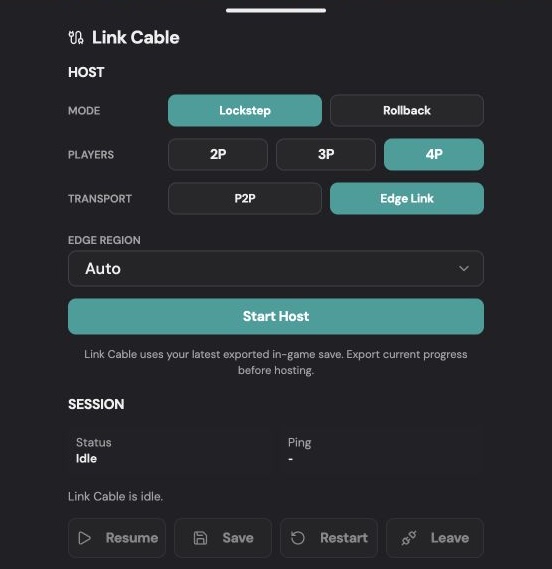
The screen above is the Rebit Link Cable host panel. The important choices are Mode, Players, and Transport. The session area below them reports the current status and exposes Resume, Save, Restart, and Leave controls when they are available.
Use these defaults:
- Lockstep + P2P: the safest first choice for two nearby players and save-sensitive play.
- Lockstep + Edge Link: useful when direct connections fail, players are far apart, or the group has three or four players.
- Rollback: a beta GBA option that can make local input feel faster, but visible corrections are possible. Use Lockstep first when protecting progress matters more than responsiveness.
After tapping Start Host, copy the complete Room Code and send it through a private chat. Guests use that code to recognize the correct card in the Netplay tab; they do not type it into the in-game Link Cable panel. The room cannot change its player count, mode, or transport after creation, so make a new room if you need different settings.
Lockstep or Rollback for Pokemon Quetzal?
Lockstep waits for coordinated network ticks. It can feel slower across long distances, but it is the conservative choice for a first Quetzal multiplayer test, especially when the session may change valuable save progress.
Rollback applies local button presses immediately and corrects the shared session when late network input arrives. It can feel more responsive on supported browsers, but brief visual or audio corrections are possible. If a player remains unreachable longer than the rollback window, the session may pause or end rather than inventing input.
Use this practical order:
- Prove compatibility with Lockstep.
- Stay on Lockstep if the delay is acceptable.
- Try Rollback only if all players are signed in, use supported browsers, and want better local responsiveness.
- Return to Lockstep if the group sees frequent corrections or unstable recovery.
P2P or Edge Link for Quetzal online co-op?
P2P connects the players directly and usually gives nearby friends the lowest delay. Start there for a two-player session in the same city or region.
Edge Link routes the room through Rebit's network. Use it when P2P never connects, a player is on mobile data or restrictive Wi-Fi, the group is spread across long distances, or you are creating a three- or four-player room. Leave the Edge region on Auto first. If the route feels consistently poor, recreate the room with a region near the geographic middle of the players.
Join the room from another browser or device
Guests join Link Cable rooms through Rebit's Netplay tab. They should not launch Quetzal and look for a guest join form inside the in-game Link Cable panel.
- Open Rebit and tap Netplay in the main navigation.
- Look under Active Rooms and refresh the list if the host's room is not visible yet.
- Match the room number to the Room Code sent by the host. Also verify the host name, game name, GBA system badge, Link Cable mode, transport, and available player seat.
- Tap Join on the correct room card.
- In Choose a GBA game, select Pokemon Quetzal from your library.
- Rebit opens the game with the Link Cable room details and begins joining automatically.
- Wait for the assigned player seat and connected status before using Quetzal's multiplayer option.
The game picker only shows eligible games from the guest's library. If Quetzal is not listed, confirm it was uploaded as a GBA game. Guests automatically use the player count, sync mode, and transport chosen by the host. If the session stays on Connecting, verify the room and game first; if P2P still fails, the host should leave and create a fresh Edge Link room.
The Netplay room list is the join path for both shared and discoverable Link Cable rooms. The Room Code is the clearest way to distinguish your friend's room from another room using the same game name.
Can friends join Pokemon Quetzal from a phone?
They can use a supported mobile browser or Rebit client capable of running the GBA game and Link Cable feature. A phone still needs enough performance to run the session smoothly, and the player should keep the game visible. Mobile data, battery-saving restrictions, incoming calls, and backgrounding the browser can interrupt a room, so stable Wi-Fi and a controller are preferable for longer sessions.
If one person wants to use a phone only as an input device rather than run their own trainer, that is a different Rebit feature: use Remote Controller. Quetzal co-op requires each trainer to occupy a real GBA player seat.
Start co-op inside Pokemon Quetzal
Rebit connects the GBA sessions; Quetzal still controls what happens inside the game. Once all players are connected, open or continue through Quetzal's own multiplayer flow and select the same player count used for the Rebit room.
Do a one-minute readiness check before continuing the adventure:
- every trainer appears where expected
- each person controls only their own trainer
- movement is visible to the whole group
- menus open and close without the screens diverging
- nobody is frozen on a loading or connection screen
Next, do one harmless shared action: walk a short route, enter and leave a building, or open and close a menu. Avoid starting with a rare encounter, important battle, trade, or irreversible event. The first minute is a connection test, not part of the serious playthrough.
Exact menu wording and availability can change between Quetzal releases. If your build does not show the multiplayer choice you expect, consult the release notes from the patch author rather than forcing a different version or loading an old save state.
What can players do in Quetzal co-op?
Quetzal's available multiplayer actions depend on its release and configuration. The room may allow trainers to appear in a shared session, explore, battle, trade, or use other multiplayer behavior provided by that build. Rebit transports the linked GBA session but does not rewrite Quetzal's rules, story flags, encounter logic, or player limits.
That distinction prevents a common misunderstanding: a successful Room Code proves that the Rebit sessions connected. It does not prove that every single-player story scene, map, battle, or script in a fan-made game is designed for several trainers at once. Follow the Quetzal author's notes for game-specific limitations and treat important story events cautiously until your group has tested them.
Protect each trainer's save
Make a normal in-game save before the session. During Link Cable play, Rebit uses each player's latest SRAM-style in-game save; if none exists, that player may begin with a blank save.
When the group is ready to stop:
- Finish any battle, dialogue, map transition, or scripted event.
- Save normally inside Quetzal where the game allows it.
- Open Link Cable in Rebit and tap Save.
- Wait for the save confirmation on every device.
- Only then should players leave the room or close their tabs.
The Link Cable Save action stores the battery-backed in-game save, not a regular emulator save state. In Rollback mode, Rebit first pauses everyone at a confirmed shared frame before exporting each player's save. Do not close the page while that is happening.
For important playthroughs, keep a separate backup before changing Quetzal versions. The guide to protect Pokemon ROM hack saves before updates explains why in-game saves are usually safer than carrying an old save state into a new build.
Why quick save and quick load are different
A normal in-game save stores the progress Quetzal expects in battery-backed SRAM. A save state captures a larger snapshot of the emulator at one moment. That snapshot can depend on the exact game build and emulator state.
During a synchronized Link Cable session, loading one player's private state would pull that session away from everyone else. Rebit therefore disables ordinary quick-save and quick-load behavior where it would break the linked room. Use Quetzal's in-game save plus the Link Cable Save action, and keep version-specific backups outside the live session.
Safe stopping sequence
Use this sequence at the end of every meaningful co-op session:
- Tell the group you are about to stop.
- Move away from battles, transitions, and scripted scenes.
- Let every player finish the current action.
- Save through Quetzal's normal menu when available.
- Use Rebit's Link Cable Save control.
- Wait for confirmation from every player.
- Have guests leave first and the host leave last.
- Reopen the saved game later and verify progress before deleting any backup.
Fix common Pokemon Quetzal co-op problems
The Link Cable option is missing
For the host, confirm Rebit identified the file as a Game Boy Advance game; the in-game Link Cable host option only appears for supported GB, GBC, and GBA games. Guests do not need that drawer to join: they use the main Netplay tab, select the active Link Cable room, and choose an eligible GBA game.
Players connect but see different things
Stop before saving. Make sure everyone uses the same Quetzal release, recreate the room, and retry with Lockstep. If the problem continues, test with only two players before adding the rest of the group.
P2P is stuck on Connecting
Create a new room with Edge Link. This is often more reliable on mobile data, hotel or campus Wi-Fi, strict networks, and long-distance connections.
Co-op feels delayed
Close unused browser tabs, avoid background downloads, and keep every game tab visible. Nearby players can try P2P. Distant or larger groups may get steadier behavior from Edge Link with a region near the middle of the group. Rollback can improve the feel of local input on supported browsers, but it remains a beta option.
A player starts with no progress
That player probably joined without an available in-game SRAM save or loaded a different game revision. Leave the room, restore the correct in-game save, launch the matching Quetzal build, and create a new room.
The game does not offer the expected multiplayer mode
Quetzal features vary by release. Verify the version and read the author's release notes. Rebit can connect compatible GBA sessions, but it cannot add a co-op feature that is absent or broken in a particular build.
One person controls the wrong trainer
Player seats follow room order: the host is Player 1 and guests take the remaining seats as they join. Leave and recreate the room, then have guests join in the intended order. Also confirm that each device has its own controls mapped and is not acting only as a Remote Controller.
The session freezes when someone changes tabs
Keep the Quetzal tab open and visible. Browsers can throttle background pages, particularly on phones and battery-saving laptops. Close heavy tabs, disable aggressive power saving for the session, and avoid locking the device while connected.
The room worked yesterday but not after an update
Confirm that every player still uses the same Quetzal revision and that nobody carried an incompatible save state into the new build. Test the updated game alone, restore backups if necessary, and create a fresh two-player Lockstep room.
Edge Link connects but feels slow
Auto region is normally the best starting point. If all players are far from the chosen route, create a fresh room using a manual Edge region closer to the group's midpoint. Do not expect a zero-latency session across continents; network distance still exists.
For more connection help, use the complete GBA Link Cable guide or Rebit's retro netplay lag checklist.
Can Pokemon Quetzal be played online with four players?
Rebit supports 2P, 3P, and 4P rooms for compatible GBA Link Cable games. Whether a particular Pokemon Quetzal release works reliably with that group size depends on the hack itself, the game revision, browsers, devices, and network conditions. Prove the setup with a short two-player test, then create a new room for the larger group.
Can I play Pokemon Quetzal online without installing an emulator?
Rebit handles supported GBA play through its browser-first client, so you do not need to configure a separate desktop emulator and manually open multiple local multiplayer windows. You still need your own legally prepared Quetzal game file, and each remote player needs their own copy in their Rebit library.
Can two people play Pokemon Quetzal online from different locations?
Yes, that is the purpose of an Internet Link Cable room. Start with P2P when both players are nearby and their networks allow a direct connection. Use Edge Link when direct setup fails, the players are far apart, or one person is on a restrictive network.
Can two people use the same Pokemon Quetzal save?
Each player should enter with their own intended in-game save. Do not overwrite one trainer's backup with another player's file just to make the room connect. Rebit prepares each seat from that player's latest available in-game SRAM save and stores each player's save through the synchronized Link Cable save flow.
Is Pokemon Quetzal online multiplayer free?
Check Rebit's current product and account information for availability because plans and feature access can change. Regardless of Rebit access, the game file is not supplied: every player must bring a lawful copy and follow the Quetzal project's distribution terms.
Do all players need Pokemon Quetzal?
Yes. Each person should add their own legally prepared copy to their Rebit library, preferably using the exact same Quetzal version. Rebit does not send the host's game file to guests.
Is this regular Rebit Netplay?
The room itself uses Rebit's GBA Link Cable feature, not classic Netplay. However, guests discover and join the Link Cable room from Rebit's main Netplay tab. The host is the only player who starts it from Quetzal's in-game Link Cable panel.
Why does the same Pokemon Quetzal version matter?
Link multiplayer assumes the connected games agree about timing, maps, scripts, data, and communication. Different Quetzal releases may change any of those. Matching revisions reduce the chance that one browser interprets the shared session differently from another.
Does Rebit provide a Pokemon Quetzal download?
No. Rebit does not provide or link to Pokemon Quetzal ROM downloads, base-game ROMs, pre-patched files, BIOS files, torrents, or copyrighted game content. Obtain patches only from the project's legitimate official source and apply them to a game backup you are legally allowed to use.
Start a private Quetzal co-op session
Prepare the same legal Quetzal build on each account, save in-game, and run a short two-player Lockstep test. The host creates the room from Quetzal's Link Cable panel; guests find its Room Code in the Netplay tab, tap Join, and select Quetzal from their library. Wait for Rebit's save confirmation before anyone leaves.
Ready to try it? Open Rebit, add your legally owned game file, and invite your friends with a private Room Code.