Use live Watch for a match happening now, a saved replay for reviewing recorded gameplay, and a video for a captured presentation you can share elsewhere. A room invitation, replay link, and video link serve different purposes. Before sending one, decide whether your friend wants to play, watch live, or revisit a particular moment.
That distinction matters after a game night: “watch our match” is not helpful if the link opens a room that has already ended. This guide gives you a simple handoff for sharing a retro netplay match, including what to check before calling a recording complete.
Pick the link for the viewer's job
| Your friend wants to… | Share or point them toward… | Check first |
|---|---|---|
| Join as a player | The room's joining instructions | A player seat is available and their setup meets the room requirements |
| Watch the current match | A supported room with Watch available | The host is still active and watching is allowed |
| Review an earlier match | Its saved replay URL | Playback opens and the relevant section was captured |
| Watch a short highlight elsewhere | A video you have permission to share | The clip includes enough context and excludes private information |
For Rebit's exact controls and current supported modes, use the Watch and Multiplayer Replays manual. Live watching and saved replay availability are separate. A room being watchable does not establish that its entire match has been saved.
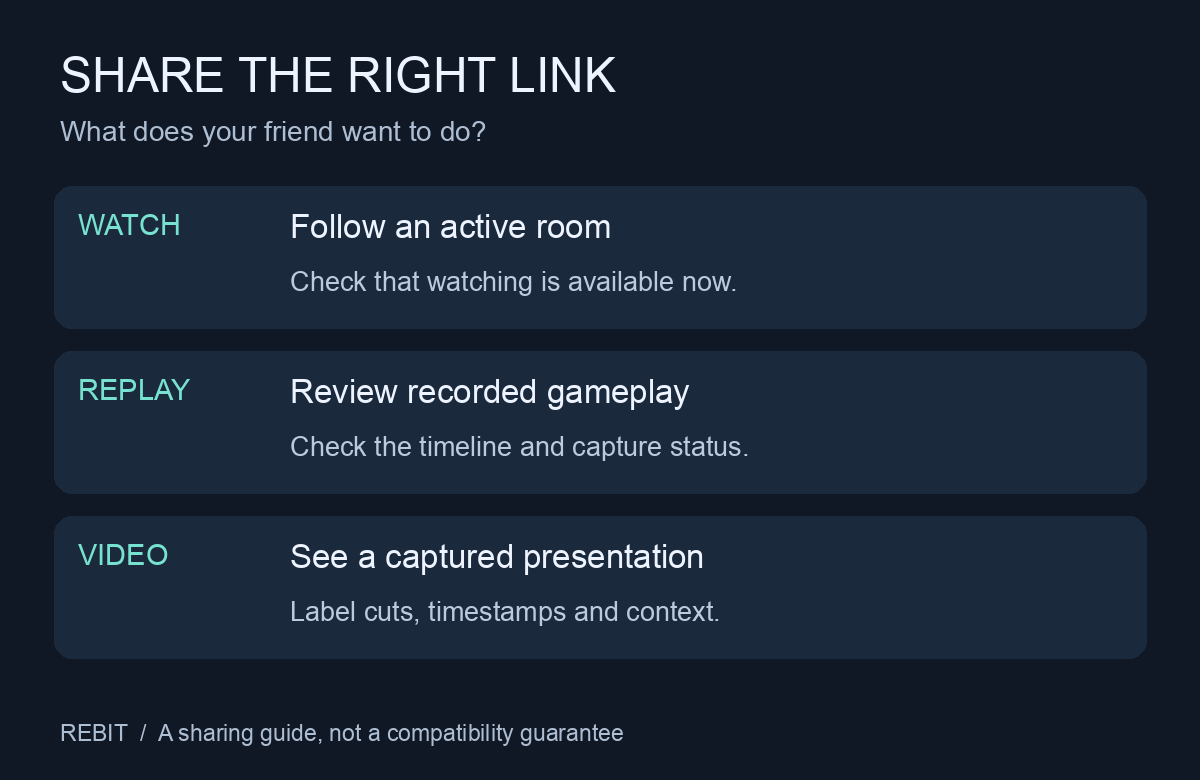
Original sharing diagram, not a gameplay screenshot or a claim that every room supports recording.
Check the replay before announcing a full match
Open the recording from Profile > Replays, or use its saved URL. Start playback and inspect the section you intend to share. If separate player screens are available, choose the view that makes the action understandable.
Use this short review:
- Identity: is this the intended game, session, and pairing? Do not identify a final solely from two familiar names if they played more than once.
- Beginning: does the recording include the setup or opening needed to understand the match?
- Moment: can you reach the turn or play your caption refers to?
- Ending: does the recorded portion include the result, or does it stop early?
- Notice: does the viewer show a verification, partial-capture, or desync message?
In Rebit, “Replay verified” describes playback reaching the recorded ending with the supported final checks matching. It does not certify a tournament ruling, the players' agreement, or that an entire event was captured. A partial recording may still show a useful moment; label it as partial instead of presenting it as the full match.
For example, an illustrative caption could say: “Practice match, opening section only; recording ends before the result.” That tells viewers what the link proves. Avoid “complete final” when you have only inspected its opening.
If you organize an event, keep the confirmed match result in your official table. The five-player tournament guide includes an opponent-confirmation template. A replay can support a review without becoming a substitute for the event's published rules.
Give a timestamp that matches the thing you shared
A timestamp in an uploaded video may differ from the saved replay's timeline. Introductions, cuts, pauses, and replay seeking can change the relationship. “Skip to 3:20” should specify video time or replay time.
Include one concrete viewing cue: the round, player screen, or action immediately before the moment. For example, “Replay time 3:20, Player 2 screen, just before the battle menu opens” is easier to follow than “look at this.” This is a sample caption, not a reference to a tested match.
For discussion, ask a question that the visible footage can answer. “Which option would you choose on this turn?” works better than claiming an unseen comeback or assigning blame for a disconnect. If the recording ends at a freeze, identify the last visible action and use the netplay freeze reporting guide for technical details.
Treat a replay link as public
Rebit's manual states that anyone with a working saved replay URL can watch without signing in. The link is not a private player invitation. The Private library setting should not be treated as a replay access control, and restricting other screens in a supported GBA room does not make a saved replay link private.
Before posting a recording outside your group, agree with the players on the audience. For a separate screen recording, check the visible browser tabs, notifications, chat, and account details too. Share the clean destination URL, not account tokens or a screenshot of private settings.
A Rebit replay reconstructs gameplay using recorded inputs and the required game files; it is not simply an exported video. Missing required files can prevent playback. Do not promise that a link will remain playable regardless of changes to those dependencies, and do not attach game or BIOS files to a public support post.
When the recording is incomplete
If uploads were interrupted, reopen the host's original browser or app, sign back in, and leave it online so pending uploads can retry. Keep that device's Rebit data intact while doing this. This can help with pending captured data; it cannot recreate gameplay that was never recorded or restore deleted local data.
If the viewer reports desync, record the URL and the visible message for support. Changing the caption or a viewer preference does not repair the capture. Share an honest partial clip only if it is still useful and everyone involved is comfortable with it.
For your next session, agree on the sharing plan before you play retro games online with friends: who will capture it, who checks the result, and where the link belongs. Afterward, send one clear message with the game/build, match label, recording status, and a timestamped viewing cue. That gives friends something they can actually watch and discuss.