When retro netplay freezes, record what stopped on each device and the exact room message before restarting. Then preserve your last known-good save and repeat one short, low-stakes segment with only one setting changed. A freeze alone does not tell you whether the cause is the game, a device, the connection, or the multiplayer runtime.
This guide is for a session that already connected and then stopped. If you cannot get into the room at all, start with the multiplayer setup documentation. If the game keeps moving but responds late, the netplay lag guide is the closer match.
First, describe what “frozen” means
Ask everyone separately what they can still see and do. One player's screen is not enough to describe the whole room.
| Observation | Record next |
|---|---|
| The picture stops, but audio continues | Whether the game controls and Rebit menu still respond |
| One player stops while others keep moving | Which player stopped first and what others see happening to that player |
| Everyone stops at roughly the same moment | The last shared action and any room status or error text |
| The game moves, but buttons take time to act | Whether delay is constant or comes in bursts |
| Players see different locations or outcomes | The first visible difference and whether a desync message appears |
These observations narrow the question; they are not diagnoses. Everyone stopping together does not prove that every device crashed. Likewise, a responsive Rebit menu does not prove the emulated game is still running normally.
For Rebit GBA Link Cable specifically, the documentation distinguishes brief rollback corrections from a reported synchronization mismatch. If a room explicitly reports a desync, stop before trading or saving and recreate the room. Do not treat an ordinary visual correction as proof of a desync. See the Link Cable troubleshooting notes.
Capture the room, not just the game title
“Pokémon multiplayer froze” leaves several important questions unanswered. Record the exact game release and the room settings that were active during the failed attempt.
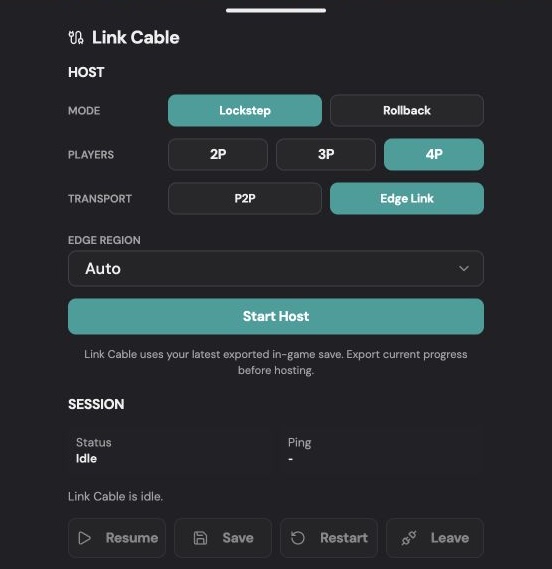
This existing Link Cable panel image shows the settings to record. It is not a screenshot of a freeze or evidence that a particular game is compatible.
For a Link Cable report, copy Mode, Transport, and player count as displayed. Lockstep versus Rollback and P2P versus Edge Link describe different choices; “online mode” does not identify either. For another multiplayer feature, use its actual labels instead.
Also note both devices, operating systems, and browser or app versions. Record whether each player used Wi-Fi, Ethernet, or mobile data. Approximate regions are enough for a first report; nobody needs your home address or public IP address.
Check interruptions without assuming blame
Ask whether a tab became hidden, a device locked, an incoming call interrupted play, or the network changed. Google's Page Lifecycle documentation explains that browsers can freeze or discard background pages. That makes visibility a useful detail to check, especially on phones.
But if everyone kept the game visible, write that down and move on. Repeating “don't change tabs” cannot explain a failure that happened without a tab change. Similarly, “my connection is fast” and “it worked for another group” do not resolve what happened in this session.
Run one comparison you can interpret
Before experimenting, keep a separate copy of each player's known-good in-game save. Do not overwrite that copy with uncertain progress from a failed session. Do not clear browser data, reinstall, or delete saves as your first troubleshooting step.
Choose a short sequence that does not involve valuable trades, rare encounters, or an important story event. Then:
- Record the original setup and the action near the freeze.
- Recreate the session with the same players, game releases, and settings. Try that short sequence again.
- If it fails again, choose one comparison: a different available transport, a different synchronization mode, or fewer players. Change only one of these at a time.
- Record the result and elapsed play time, including attempts that work.
For Rebit Link Cable, changing the room mode requires a new room. Check the current save controls before testing; do not assume every room allows save export while running. The linked documentation describes mode-specific restrictions.
A useful result is “two players, same builds, same route, transport changed; no freeze in a ten-minute test.” An unhelpful conclusion is “fixed forever.” One successful attempt cannot establish reliability, especially when the original failure was intermittent.
If the same action also fails during solo play, report that comparison. It gives support another way to investigate; it does not by itself prove that the game file is defective.
Copy this report into your support message
Game and exact release:
Date/time and time zone:
Players and assigned seats:
Each device / OS / browser or app version:
Room mode and transport:
Connection types and approximate regions:

Last action before the freeze:
One player or everyone affected:
Audio still playing? Controls responding? Rebit menu responding?
Exact room message (or “no message”):
Any tab switch, screen lock, call, or network change:
Time from joining to failure:

Repeat attempt with original settings:
One setting changed and result:
Last known-good save preserved:
Attach a cropped screenshot of the relevant error if available. Remove account details, unrelated notifications, and private chat. If the session has a replay you are comfortable sharing, add the approximate point where the problem occurred; a missing or incomplete replay is not evidence that the session was healthy. Never attach ROMs or BIOS files. Rebit does not provide copyrighted game downloads; use your own legally obtained files.
For Pokémon Quetzal online multiplayer, include the release number rather than only “Quetzal.” Keep setup questions in that guide and use this report for the specific failure after connection.
When you are ready to try again, agree on one short test with your group. The goal is to return to playing retro games online with friends with a clearer account of what worked—and something actionable for support if it stops again.